I've, a couple of days ago upgraded to Lucid Lynx (10.04) BETA 1. I only can afford one PC and it turned out that wasn't the best idea to update to BETA 1 where I need my PC working all the time.
However , it wasn't long before I could get it to a working state, albeit, some goodies missing.
One thing that took my time ,(but no solution yet :( ) , is the missing proprietary ATI Radeon VGA drivers. Apparently , AMD hasn't released the ATI drivers suitable for Xorg 7.5 (?) and I'm still running with out any graphical goodies enabled.
Compiz still does not work and Plymouth crashes from time time and gdesklets fails to launch! ;).
These issues aside, the new version boots up quite fast, works slick, the new icons in Empathy are really appealing. I still need to explore the 'Application Indicators' technology.
One thing that stumped me was the automatic switch from Sun (well, now Oracle) java SDK to Open JDK. The good thing although is, I did not notice any difference when using Ecliopse, but I'd prefer to use the Sun JDK.
So, a quick way to change it back:
sudo update-java-alternatives -s java-6-sun
I hope the ATI drivers are out soon and gdesklets gets fixed soon so that I can use my custom developed applets!
Tuesday, April 13, 2010

Monday, November 30, 2009
OpenOffice - Programmatically!
A while ago, I had to parse an XML file and generate a spread sheet out of it.
I could have probably used an XSLT transformation; but as I was learning Python and was dying to try something on XML parsing - took some pain in understanding the format of the XML file and then set out to parse the XML file.
Being new to XML parsing and did not want to go through a lot of trouble, used the xml.dom.minidom parser and finished parsing the XML file.
Now, how did I create the spread sheet? I'll tell ya -
Well, I did not xactly create a spread sheet; instead, I created a simple HTML file with a table structure in it!
Now, all I had to do was to drag and drop the HTML file into an empty OpenOffice spread sheet! and valla..I had my spread sheet ready to be saved in the format of my choice..
However, as any programmer would agree, this is not the most optimised way of doing things and also felt a bit like cheating!
So, I took up the task of creating spread sheets programmatically using OpenOffice and Python. (Java might have been a better choice - but my Java is sorta - pathetic)...
OpenOffice comes with the PyUno module that makes this possible. I'm taking one little baby step at a time in doing this and I'm happy to say - I've started off successfully, creating a very simple and basic spread sheet :).
More on how to and what to do stuff in my next post !
Also, look out for my coming post on Python - GIMP combination and how to reduce the size of your Photography collection - without deleting files and without loosing the quality of the pictures - well, visibly in a few minutes
(I actually already have a shell script, GIMP combination doing this already - very well infact; but want to move this to a proper Python code as GIMP has very strong affinity to Python)
I could have probably used an XSLT transformation; but as I was learning Python and was dying to try something on XML parsing - took some pain in understanding the format of the XML file and then set out to parse the XML file.
Being new to XML parsing and did not want to go through a lot of trouble, used the xml.dom.minidom parser and finished parsing the XML file.
Now, how did I create the spread sheet? I'll tell ya -
Well, I did not xactly create a spread sheet; instead, I created a simple HTML file with a table structure in it!
Now, all I had to do was to drag and drop the HTML file into an empty OpenOffice spread sheet! and valla..I had my spread sheet ready to be saved in the format of my choice..
However, as any programmer would agree, this is not the most optimised way of doing things and also felt a bit like cheating!
So, I took up the task of creating spread sheets programmatically using OpenOffice and Python. (Java might have been a better choice - but my Java is sorta - pathetic)...
OpenOffice comes with the PyUno module that makes this possible. I'm taking one little baby step at a time in doing this and I'm happy to say - I've started off successfully, creating a very simple and basic spread sheet :).
More on how to and what to do stuff in my next post !
Also, look out for my coming post on Python - GIMP combination and how to reduce the size of your Photography collection - without deleting files and without loosing the quality of the pictures - well, visibly in a few minutes
(I actually already have a shell script, GIMP combination doing this already - very well infact; but want to move this to a proper Python code as GIMP has very strong affinity to Python)
Sunday, November 1, 2009


Saturday, October 31, 2009
How to integrate Pydev in Eclipse for Ubuntu Karmic Koala
I'm an avid Vi user. For any of my tasks on Linux, I prefer the powerful command prompt and the Vi editor. That was more than sufficient for all my tasks earlier. However,the last month, I've taken up the task of writing some solid python code and managing the code as it moved upto 5+ files was turning out to be a problem. The solution : Eclipse-pydev package: http://pydev.org/
This is an Eclipse plugin that will allow Python development in Eclipse.
The eclipse-pydev package was available until Ubuntu Jaunty and in Karmic, this package has been removed :
http://ubuntuforums.org/showthread.php?t=1307755
https://bugs.launchpad.net/ubuntu/+source/eclipse-pydev/+bug/450031
https://bugs.launchpad.net/ubuntu/+source/eclipse-pydev/+bug/135556
The following steps show how to install the Pydev package on Eclipse for Karmic. Remember, the package is not available officially in Ubuntu Karmic and if you run into any troubles, you can only post in the Ubuntu forums and hope for help (which I'm sure, you'll receive and a good one, as I did)
For this, it is necessary that you run Eclipse as a super-user for once. After the plugin installation is complete, you can use Eclipse as a normal-user
After launching Eclipse as a super-user
1. Click Help -> Install New Software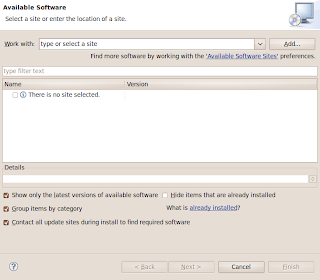
2. Click "Add"
3. Add Name: Pydev and Location: http://pydev.org/updates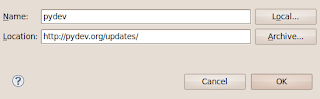 and Click "OK".
4. Now you should see two options as shown here. Select only "Pydev" and follow the screen shots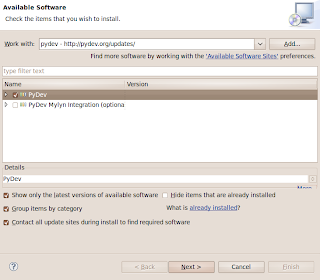
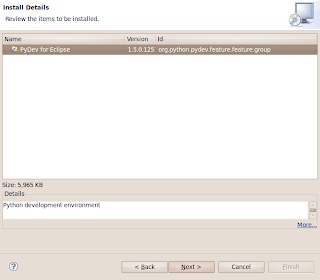
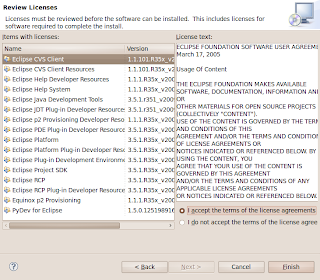
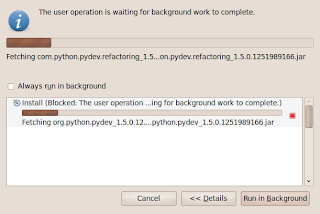
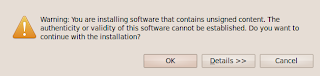

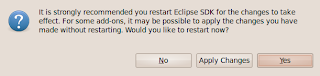
5. Restart Eclipse and you should now be able to develop Python code in Eclipse :)
Leave a comment in here if you see something different!
This is an Eclipse plugin that will allow Python development in Eclipse.
The eclipse-pydev package was available until Ubuntu Jaunty and in Karmic, this package has been removed :
http://ubuntuforums.org/showthread.php?t=1307755
https://bugs.launchpad.net/ubuntu/+source/eclipse-pydev/+bug/450031
https://bugs.launchpad.net/ubuntu/+source/eclipse-pydev/+bug/135556
The following steps show how to install the Pydev package on Eclipse for Karmic. Remember, the package is not available officially in Ubuntu Karmic and if you run into any troubles, you can only post in the Ubuntu forums and hope for help (which I'm sure, you'll receive and a good one, as I did)
For this, it is necessary that you run Eclipse as a super-user for once. After the plugin installation is complete, you can use Eclipse as a normal-user
After launching Eclipse as a super-user
1. Click Help -> Install New Software

2. Click "Add"
3. Add Name: Pydev and Location: http://pydev.org/updates
 and Click "OK".
4. Now you should see two options as shown here. Select only "Pydev" and follow the screen shots


5. Restart Eclipse and you should now be able to develop Python code in Eclipse :)
Leave a comment in here if you see something different!
Friday, October 16, 2009
Ubuntu and Mobile Broadband
I have purchased a Nokia E63 a couple of months back and I like the phone...for all its features and the best part - it gets me connected when ever and where ever I (well, where ever my service provider has a tower ;) )want!
Couple of reasons why I bought this phone
1. WLAN
2. Connect to PC and work as Modem
3. QWERTY Keyboard
I have not until today used the 'Modem' feature yet. But, in a couple of days, I'm planning to visit a remote place where I'm not expecting any internet connection (but a full mobile service!). So, wanted to test that out. I googled and went through a couple of blogs that discussed about wvdialconf & wvdial, but did not work for me. Then one of the posts in the Ubuntu forums (can't find the link :( ) caught my eye.
Here are the steps
1. Right click on the Network Manager applet and click 'Edit Connections'
2. Click on the Mobile broadband tab
3. Add a new connection and follow through the two dialogs
and valla, it works! it works out of the box! Is Linux easy to use or what?
oh and, me and friend of mine..got the USB sound device working with some tweaking..more on that in the next post!
As you can see on the right, only a few days left for the next big release..eagerly waiting!
Couple of reasons why I bought this phone
1. WLAN
2. Connect to PC and work as Modem
3. QWERTY Keyboard
I have not until today used the 'Modem' feature yet. But, in a couple of days, I'm planning to visit a remote place where I'm not expecting any internet connection (but a full mobile service!). So, wanted to test that out. I googled and went through a couple of blogs that discussed about wvdialconf & wvdial, but did not work for me. Then one of the posts in the Ubuntu forums (can't find the link :( ) caught my eye.
Here are the steps
1. Right click on the Network Manager applet and click 'Edit Connections'
2. Click on the Mobile broadband tab
3. Add a new connection and follow through the two dialogs
and valla, it works! it works out of the box! Is Linux easy to use or what?
oh and, me and friend of mine..got the USB sound device working with some tweaking..more on that in the next post!
As you can see on the right, only a few days left for the next big release..eagerly waiting!
Friday, October 2, 2009
Ubuntu Karmic Koala A.K.A. Ubuntu 9.10
Hmm..I cannot tell u ..how many times..writing this blog saved me from re-inventing the wheel..
Now, as you can see on the right side...Ubuntu Karmic Koala , alias, Ubuntu 9.10 is Beta now ..Yay!
Download using the torrents is in progress now...
Will run it on the Virtual box in a couple of hours :)..and btw, I'm buying a new Dell Laptop (Dell studio 15) and will hopefully run Karmic on it!
I cannot really use the netbook version as I'll be rampaging on the laptop..but I'd love to try it on VM..Keep watching this space for some nice screen-shots and tips with Karmic!
Now, as you can see on the right side...Ubuntu Karmic Koala , alias, Ubuntu 9.10 is Beta now ..Yay!
Download using the torrents is in progress now...
Will run it on the Virtual box in a couple of hours :)..and btw, I'm buying a new Dell Laptop (Dell studio 15) and will hopefully run Karmic on it!
I cannot really use the netbook version as I'll be rampaging on the laptop..but I'd love to try it on VM..Keep watching this space for some nice screen-shots and tips with Karmic!
Saturday, August 1, 2009
Ubuntu , Sun Java JDK and Eclipse
For some reason, I had installed Eclipse on my system and as a dependency it pulled java-gcj packages along with it and if JAVA_HOME is not set, it ends up using java-gcj packages.
BTW, I have a question is java-gcj the same as OpenJDK? (which went through Sun's certification recently)?
Any way, I've for all my purposes (well, a very less # them) had used Sun's JDK and JRE all my life and did not want to move to another JDK and JRE.
I had already installed using Synaptic sun-java6-jdk and related packages
However, after the installation of Eclipse, it always uses the java-gcj binaries and not the Sun's Java binaries.
What to do? Ubuntu's help at work again. Thank you Ubuntu's Documentation team!
Here is the link:
Below are the commands:
update-java-alternatives -l
Should list you the possible alternatives
To choose Sun's java/JDK
sudo update-java-alternatives -s java-6-sun
and ofcourse, I've had to set the JAVA_HOME in /etc/profile
Valla, now eclipse uses Sun's JDK and JRE :)
BTW, I have a question is java-gcj the same as OpenJDK? (which went through Sun's certification recently)?
Any way, I've for all my purposes (well, a very less # them) had used Sun's JDK and JRE all my life and did not want to move to another JDK and JRE.
I had already installed using Synaptic sun-java6-jdk and related packages
However, after the installation of Eclipse, it always uses the java-gcj binaries and not the Sun's Java binaries.
What to do? Ubuntu's help at work again. Thank you Ubuntu's Documentation team!
Here is the link:
Below are the commands:
update-java-alternatives -l
Should list you the possible alternatives
To choose Sun's java/JDK
sudo update-java-alternatives -s java-6-sun
and ofcourse, I've had to set the JAVA_HOME in /etc/profile
Valla, now eclipse uses Sun's JDK and JRE :)
Subscribe to:
Posts (Atom)
